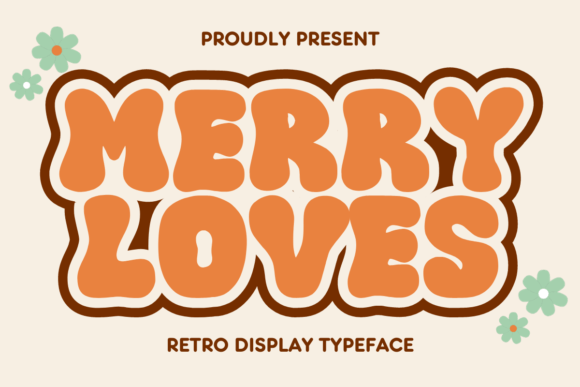
Integrating Merry Loves: A Practical Guide to Holiday Typography Workflows
In the fast-paced environment of seasonal design, the difference between a generic holiday asset and a memorable brand moment often lies in typographic selection. Merry Loves is a festive and unique typeface that serves as more than just a decorative element; it is a strategic tool for designers, marketers, and small business owners aiming to capture the essence of the season. Whether you are designing greeting cards, banners, social media graphics, or marketing materials, this font adds a touch of Christmas charm to your text, spreading joy and warmth during the holiday season. However, successfully deploying a display font like this requires a structured approach to ensure it enhances rather than hinders your project workflow.
Strategic Placement in the Design Process
Integrating a specialized font like Merry Loves should not be an afterthought. In a professional workflow, typography decisions typically occur during the conceptualization phase, before high-fidelity mockups are built. When planning a holiday campaign, identify where emotional resonance is required. This typeface excels in headlines, call-to-action buttons, and short-form messaging where personality is paramount. It is less suitable for body copy or dense informational text, where legibility takes precedence over style.
By defining the role of Merry Loves early in the project brief, you prevent scope creep and ensure consistency across deliverables. For instance, if you are a freelancer managing a client's end-of-year sale, specify that this font will be used exclusively for promotional headers while a neutral sans-serif handles the terms and conditions. This separation of duties within your typographic hierarchy streamlines the review process and reduces the likelihood of readability complaints from stakeholders.
Compatibility and Technical Preparation
Before diving into creative execution, verify the technical compatibility of the font file with your existing software stack. Merry Loves is designed to work seamlessly with industry-standard applications such as Adobe Photoshop, Illustrator, InDesign, and Canva. However, workflow efficiency depends on proper installation and organization. Ensure the font files (OTF or TTF) are installed at the system level or synced via a font management tool like Adobe Fonts or Extensis Suitcase Fusion.
For teams collaborating remotely, centralize the asset. Do not rely on individual team members to source the font independently, as version discrepancies can lead to rendering errors in final exports. Upload the licensed font file to your shared cloud storage or project management platform (e.g., Dropbox, Google Drive, or Asana) alongside your brand guidelines. This preparation step eliminates bottlenecks when multiple designers are working on variations of the same campaign.
Additionally, consider web implementation if your project involves digital interfaces. If you plan to use Merry Loves on a website banner or landing page, check the licensing terms regarding webfont embedding. You may need to convert the file to WOFF or WOFF2 formats and host them on your server or utilize a CDN. Testing load times is crucial; decorative fonts can sometimes be file-heavy, potentially impacting page speed scores if not optimized correctly.
Workflow Integration Across Different Media
The versatility of Merry Loves allows it to fit into diverse production pipelines, from print to digital. Understanding how to adapt the font for each medium ensures high-quality outcomes.
- Print Production: When designing physical items like greeting cards or packaging, pay close attention to kerning and tracking. Display fonts often have unique spacing characteristics that may require manual adjustment to avoid awkward gaps between letters, especially at larger sizes. Always request a physical proof before full-scale printing to verify that the intricate details of the font render clearly on the chosen paper stock.
- Social Media Graphics: In the context of Instagram stories, Facebook ads, or Pinterest pins, speed is essential. Create templates in your design software where Merry Loves is pre-applied to headline layers. This allows you to swap out text quickly without re-styling elements. Ensure sufficient contrast between the font color and the background image to maintain accessibility standards on small mobile screens.
- Email Marketing: For email newsletters, remember that most clients do not support custom web fonts. Use Merry Loves to create header images or GIFs within your email builder rather than typing directly into the text editor. This guarantees that every subscriber sees the intended typography regardless of their email provider.
Enhancing Brand Consistency and Tone
One of the primary challenges in seasonal marketing is maintaining brand identity while embracing holiday themes. Merry Loves offers a solution by providing a distinct voice that can be paired with your core brand assets. The key is moderation. Use the font to highlight specific emotional triggers—such as "Gift Guide," "Holiday Sale," or "Season's Greetings"—while keeping your primary logo and navigation elements consistent with your year-round branding.
This balanced approach prevents the brand from feeling disjointed once the holiday season concludes. By treating Merry Loves as a temporary overlay rather than a permanent replacement, you create a sense of occasion without diluting long-term brand equity. Document these usage rules in a seasonal style guide. Include examples of correct and incorrect applications, such as avoiding all-caps settings if the font's lowercase forms are more distinctive, or specifying minimum size requirements to preserve legibility.
Efficiency Tips for High-Volume Projects
During the holidays, turnaround times are often compressed. To maximize efficiency when using Merry Loves across multiple projects, leverage automation features in your design tools. In Adobe Creative Cloud, utilize Character Styles to save your preferred settings for the font, including size, leading, and color. This allows you to apply the correct styling with a single click across dozens of artboards or documents.
For non-designers or content creators using platforms like Canva, upload the font to your brand kit immediately upon purchase. This ensures that anyone on your team with access to the brand kit can utilize Merry Loves without needing to upload the file repeatedly. Furthermore, create a library of pre-designed elements—such as badges, ribbons, or text overlays—using the font. These assets can be dragged and dropped into new compositions, significantly reducing production time for social media posts or internal communications.
Quality Control and Final Review
As with any design element, a rigorous quality control process is vital before publication. Because Merry Loves has a stylized, hand-lettered aesthetic, it can sometimes be difficult to read at smaller scales or against busy backgrounds. Conduct a "squint test" on your designs: blur your vision slightly and see if the message remains clear. If the text becomes illegible, increase the font size, simplify the background, or add a subtle drop shadow or stroke to separate the letters from the imagery.
Also, verify licensing compliance one final time before public release. Ensure that your usage aligns with the license purchased, particularly if the project involves commercial merchandise or large-scale distribution. Keeping a record of your license receipt and terms in your project folder protects you and your clients from potential legal issues down the line.
Long-Term Asset Management
After the holiday rush subsides, proper organization ensures that Merry Loves remains a valuable resource for future years. Archive your project files in a dedicated "Seasonal Assets" folder, clearly labeled with the year and campaign name. Tag the font file in your digital asset management system with keywords like "Christmas," "Holiday," "Display," and "Festive." This metadata makes it easy to retrieve the font when planning next year's strategy, allowing you to build upon previous successes rather than starting from scratch.
By treating Merry Loves as an integral part of your seasonal workflow rather than a mere decoration, you elevate the quality of your output and streamline your production process. Whether you are a solo entrepreneur crafting personal greetings or a marketing director overseeing a global campaign, this typeface provides the perfect blend of charm and professionalism to make your holiday communications stand out.